

On Pro and Pro Max plans, users can choose to connect their OneDrive to Img.vision.
Using this connection, you can import images to your Img.vision drive that are stored on your OneDrive.
The benefit is that you don’t need to upload the files from your own local device:
- You don’t need to download your OneDrive images first and then reupload them. This is a time saver.
- Traffic of download/uploading doesn’t go through your home/work network, so no large traffic incurred costs if you’re on a metered network.
- The speed of the upload can be faster since OneDrive and Img.vision servers make a direct connection to each other, not limited by the speed of your home/work network.
Warning when connecting Img.vision to OneDrive
You will see this warning when connecting your OneDrive to Img.vision:
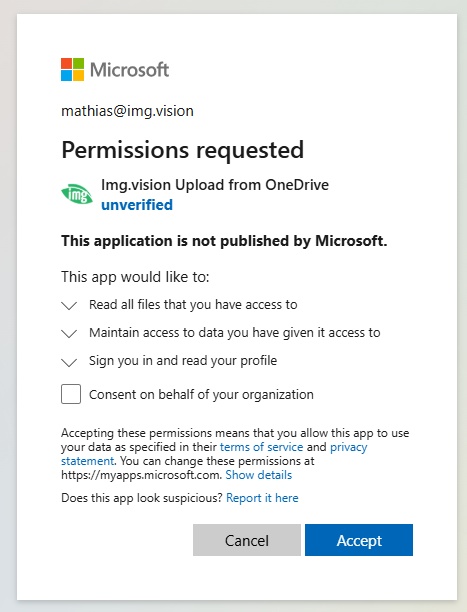
And if you click on “unverified”:
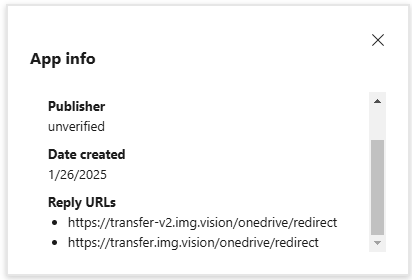
Note how the Reply URLs contain img.vision as domain.
You can safely accept this warning.
We do not have enough customers using this integration with OneDrive which is why the warning is shown. Once we have enough customers using it, we can go through the process of getting the warning removed.
Folder imports
Our update on June 29, 2026 unlocked folder imports from OneDrive. Select a folder to import and all subfolders will also be imported. The hierarchy of subfolders will be recreated and each folder will contain the images just like on your OneDrive.
