
Walmart image hosting handbook

|
Last updated February 9, 2026
Your complete hub for Walmart product image troubleshooting: from blurry photos and rejected primaries to variation mix-ups and slow catalog updates.
If your images look wrong in Walmart Seller Center, Feeds, WPSS, or the Marketplace API, this page gives you clear explanations and directs you to the exact guide you need.
Selling on Walmart becomes far easier when you know how Walmart handles:
- image compression
- content ownership rules
- catalog overrides
- ingestion queues
- variation inheritance
- and the strict criteria for accepted image formats.
Browse the guides below to quickly diagnose and fix your specific problem.

On this page
🔧 Walmart Image Troubleshooting Guides
1. Why Walmart Makes Product Images Look Blurry? Understanding Walmart’s Compression System
Why do crisp, high-resolution images suddenly look soft or pixelated after upload?
Learn how Walmart recompresses, downsizes, and re-encodes images, how it affects zoom quality, and what resolutions actually work best.
👉 Read the full guide
2. Image Links in Walmart Seller Center
Uploading images one-by-one? This walkthrough shows how Seller Center treats manual uploads differently from Feeds or API submissions… and how to avoid unexpected overwrites, wrong primaries, and missing alt images.
👉 Open the step-by-step guide
3. Why Walmart Doesn’t Accept External Image URLs (Feeds, APIs, Setup)
Walmart is far more restrictive than Amazon and eBay when it comes to external image hosting.
This article explains why many external URLs fail ingestion, how Walmart checks HTTPS, redirects, MIME types, image headers, and file formats… and how to prepare URLs Walmart will accept.
👉 Learn why Walmart rejects external image links
4. Walmart Images Not Showing After Publishing? Missing, Blank, or Wrong Photos
Your item is live… but the images are not?
This guide covers the most common causes: catalog overrides, missing ownership, ingestion delays, suppressed assets, or conflicting feed submissions.
👉 See all reasons Walmart images fail to appear (and how to fix each)
5. Fixing Walmart “Primary Image Rejected” Errors
One of the most common seller frustrations.
This guide breaks down every rejection reason: borders, collages, low resolution, wrong angle, transparency, watermarks, aspect ratio issues, and more… plus how to prepare images that pass every time.
👉 Fix your rejected primary image
6. Why Walmart Replaces Seller Images (Catalog Overrides & Content Ownership)
Walmart may replace your uploaded photos with images from manufacturers, distributors, or other sellers.
This guide explains ownership scores, content quality rules, and how to regain control of your product images.
👉 Understand Walmart’s catalog override system
7. Why Walmart Image Updates Take So Long — Stuck or Delayed Photos
If your new images take hours or days to appear, this guide reveals how Walmart’s internal pipelines work: ingestion queues, moderation, caching layers, and priority rules.
👉 Learn why updates stay “Processing” for so long
8. Walmart Variation Image Issues? Wrong Colors, Size Mix-ups & Duplicate Photos
Variation listings behave differently depending on the parent/child structure.
This guide shows why Walmart sometimes copies the wrong images across variants, ignores color-specific photos, or mismatches SKUs… and how to fix the variation logic.
👉 Fix variation image problems
If you need permanent image URLs for Walmart bulk uploads, Seller Center, or marketplace integrators, see our dedicated Walmart image hosting solution built for small to high-volume sellers.
Bulk upload images
Bulk upload and host your product images for Walmart.
Img.vision is built for sellers who need fast, reliable media hosting with easy links for every listing.
- ✅ Easy & bulk-friendly
- ✅ Static, reliable URLs
- ✅ Optimized image delivery for Walmart crawlers
- ✅ No overages
- ✅ 100% CDN uptime¹
Prices start at 7.99 USD/month.
¹ Achieved in 2025
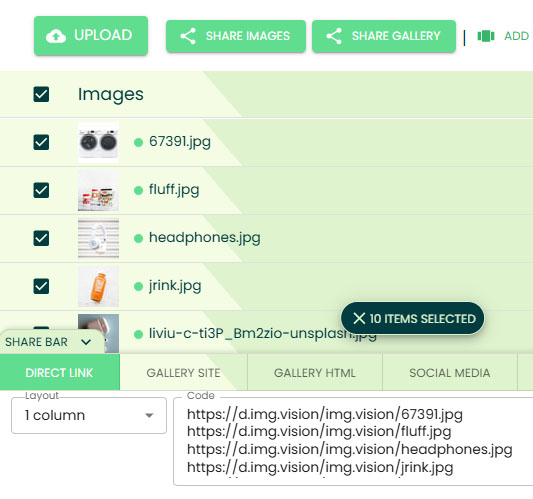
Img.vision integration options for Walmart marketplace
These are the verified Img.vision integration options for the Walmart marketplace:
- ✅ Excel (.xlsx) product uploads
- ✅ Excel macro-enabled workbook (.xlsm) product uploads
Image formats supported by Walmart
The following image formats are supported through bulk product uploads by Walmart. Next to the Walmart supported formats, the supported formats of Img.vision are listed. You can use Img.vision for your bulk uploads if there is a checkmark in both columns.
| Format | Walmart | Img.vision |
|---|---|---|
| JPG | ✅ | ✅ |
| JPEG | ❌ | ✅ |
| PNG | ✅ | ✅ |
| GIF | ❌ | ✅ |
| HEIC | ❌ | ✅ |
| WEBP | ❌ | ✅ |
| AVIF | ❌ | ✅ |
| TIF | ❌ | ✅ |
| BMP | ✅ | ✅ |
Bulk image upload size limit
When uploading products in bulk, you need to adhere to this file size limit for each individual image. If you are referencing images that exceed the maximum limit, the bulk product upload will fail.
| File size limit: | 5 MB |
|---|---|
| Recommended maximum file size: | 1 MB |
Product image dimensions
These are the image dimension specifications for Walmart:
| Minimum image dimensions: | 1500 x 1500 pixels for zoom, 500 x 500 pixels for non-zoom listing. Generally the aspect ratio is square (1:1), but for fashion items it should be portrait (3:4). |
|---|---|
| Recommended image dimensions: | 2200 x 2000 pixels |
| Maximum image dimensions: | Walmart only uses the file size as a limit, not the dimensions. |
Countries you can sell to
You can sell on Walmart to the following countries:
CanadaChileMexicoUnited States
FAQ
Can you upload products in bulk?
Yes, you can upload products in bulk to Walmart. You need to use a specific excel with a specific format. We have a guide on how to create this excel here: Guide to bulk product uploading on Walmart.
Where do you host the images inside the product excel?
Well, you’ve come to the right place: Img.vision is a perfect partner to keep your images hosted.
The steps:
1. Upload your images to your Img.vision drive
2. Generate a list of your hosted images using your drive link prefix + image filenames
3. Add the links to your product excels
4. Upload your product excelsWhy use Img.vision?
We offer static public image links.
So we don’t generate links like link.com?id=12123&d=gfdjho4569789fgdsjhknm448998&l=546546fggf456gf456io784
We generated a clean link like: d.img.vision/DriveName/ImageFileName.jpgWhat are the benefits of using Img.vision image hosting
Upload your images into one central image hosting repository, add it to your ecommerce platform excel files, and upload them to multiple marketplaces.
Can you upload images below the fold?
Check out this guide on uploading images below the fold, inside the product description:
Guide on single image uploads on Walmart.
Menu
Articles
Choose an article from the left menu.