

Drag & drop moving into folders
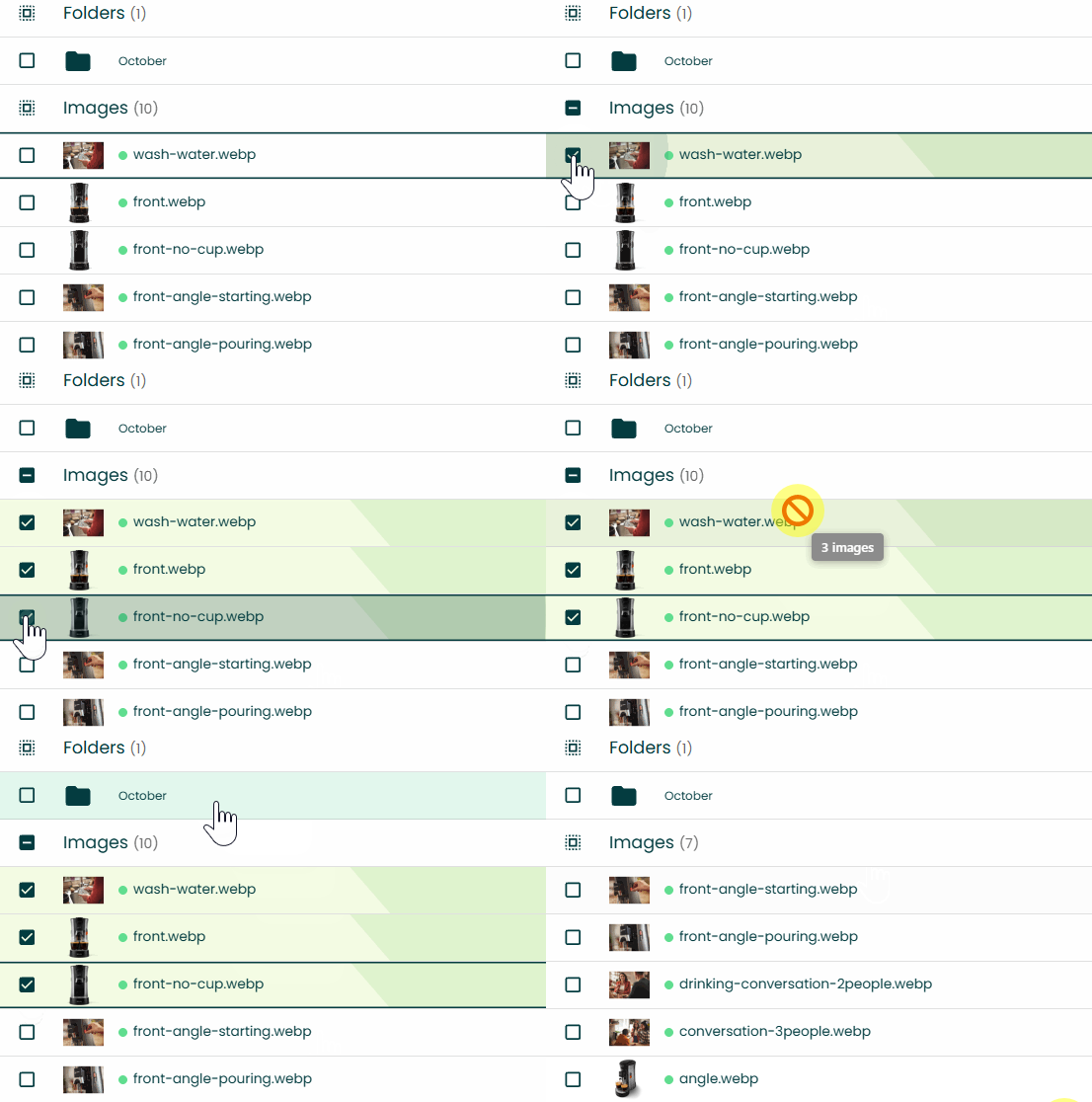
By request, we’ve added the ability to move images/videos/folder into folders by dragging and dropping them.
This feature is available to all users.
Tip: When you’re inside a folder, you can also drag items onto a breadcrumb to move them into that folder.
Upload from clipboard
All paid plans now support uploads from the clipboard when the upload widget is open, both images and videos.
On Windows that’s Ctrl+V and on Mac it’s Cmd+V.
Bulk rename
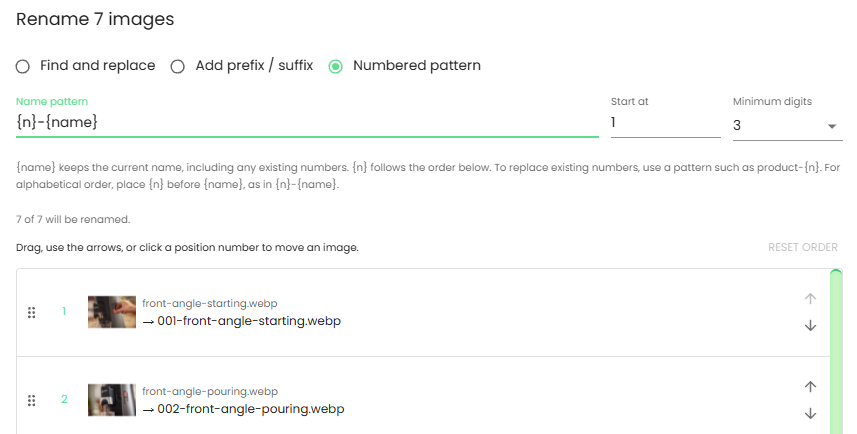
A bulk image rename feature is now available.
You can:
- Find and replace. Including removing parts by keeping the replace field empty.
- Add a prefix / suffix
- Add a numbered pattern (at any place inside the filename)
The numbered pattern option also offers a visual drag & drop list with a small image thumbnail. Some eBay sellers have a workflow where they need the images to be in a certain order. This bulk rename feature allows adding a number prefix and then reordering the images using drag & drop before the new numbering is applied. This should speed up the workflow for sellers who work this way.
When you select one image and you click the top action bar rename button, the normal rename dialog opens. If you select multiple images, the bulk rename dialog opens.
Marketplace crawler fetch reliability
One of the biggest benefits of Img.vision over other generic image hosts is that we configure our image delivery to be fully compatible with marketplace crawlers. Non-human traffic (crawlers and bots) is typically throttled or blocked outright by generic hosting infrastructure, which causes issues when trying to upload to marketplaces.
In the past, configuring the image delivery servers was handled by me manually: exploring image traffic data, researching and evaluating candidates, and reconfiguring the image servers.
Now, this process works in an automated way, meaning it can be more thorough and be updated faster. Img.vision will scan our image delivery servers for marketplace crawler traffic, identify, evaluate and update our image delivery servers’ configuration to ensure maximum compatibility. I stay in the loop of this process to make sure there are no mistakes.
We’ve also expanded our marketplace compatibility to cover these image file types: avif, bmp, tif, tiff, heic. Jpg, jpeg, png, webp and gif were already supported.
Video direct download links & replace videos
It is now possible to generate direct download links for videos. The download feature creates an MP4 file with a permanent download link that ends in the filetype .mp4 to ensure maximum marketplace compatibility.
You don’t need to reupload your videos to get access to this feature, a direct download link can be generated from existing videos.
You can now replace an existing video with another right from your dashboard. No edits to the embed code are needed (eg. you don’t need to ask your webmaster for website HTML changes anymore).
After uploading a new video using the replace action, the view link and new embed code will automatically start showing the new video. This process takes a few minutes.
Update your existing embed code to start benefiting from this feature.
Existing embed code will continue to show your videos as before, but only the new embed code has this replace feature.
You don’t need to reupload any videos to get this feature, the dashboard shows the new embed code for all existing videos, we migrated them to the new platform (had no effect on uptime).
You can now archive (take videos offline) and restore videos (put them back online). It works 1 by 1 or in bulk.
A warning is now shown if you configure the video embed code to autoplay without enabling mute: most browsers block video autoplay if mute is disabled.
Fixed: The playable domains setting in the video’s right side panel (bottom right on desktop) was partly covered by the contact bubble.
Bugfix: Trying to upload more videos than your plan allows prevented further uploads until you refresh the page.
Bugfix: Limiting video playback based on domain also archived the video, meaning it didn’t load anymore. This has been fixed.
Improved reliability for Chinese users
Chinese users could not register an account due to Google reCAPTCHA not loading. A captcha is a type of puzzle (visible or invisible) to make it harder for bots to signup. It has been replaced by Friendly Captcha. I will monitor whether this service is more reliable.
In addition, our dashboard font no longer loads from Google servers but from our own dashboard server, which fixes loading issues.
Bugfixes
Bugfix: The sorting of images/videos directly after an upload could differ in certain edge cases from the sorting if you open the same folder later on.
Bugfix: Shift selecting while scrolling down to images not currently in your view was broken if you did it right after an upload of images.
Fix: The Iubenda cookie preferences widget floated above the left menu items. It moved to the settings page as a link under Legal.
Bugfix: The animation for the bulk restore images action could get stuck in certain edge cases.
Fix: The upload status bar widget showed “Complete” when the entire upload flow had not fully completed yet. It now shows a different message than “Complete”. This could previously be confusing, especially with bulk uploads, because it seemed your upload completed, but your images did not appear in your dashboard. The reason is that after the actual upload, Img.vision will first check every image to see if it passes marketplace compatibility.
Bugfix: The image counter (next to the Select all images checkbox) wasn’t updating after images were deleted. Folder and video counters didn’t have this issue.
Bugfix: Copying the image link in the grid layout using the copy icon hovering above the thumbnail had an edge-case bug where the wrong animation could be shown.
Maintenance
Improved stability by updating the core code that handles image actions (store, delete, rename).
Many security improvements. For security reasons, I don’t mention the specifics.
