
Image hosting for ecommerce sellers
Img.vision hosts your product images and gives you permanent, direct URLs that work on every marketplace. Upload in bulk, keep your filenames exactly as they are, and paste the links into flat files, listing tools, or seller dashboards.
No redirects, no expiry, no renaming. eBay, Amazon, Walmart, Shopify, and every other marketplace that accepts image URLs will fetch and display your images without rejection, because the CDN is built to handle marketplace crawlers and regular browser traffic.

On this page
Scalable image hosting built for ecommerce

We don’t rename your images
Built for CSV-based product sheets, your images will still have the same filename after upload. Simply use the formula ="https://d.imgvision.net/your-drive-name/" & A2 in Excel or Google Sheets (where column A contains your image filename) and your permanent, marketplace-ready image URL is generated instantly.

No redirects on your image links
We don’t redirect your image links or change them. This saves you from a lot of frustration when relisting.

Links don’t expire
We don’t delete low-traffic images, and in the other extreme, we don’t delete your images if they become too popular and generate a lot of traffic.

Built for listing tools
Seamlessly plug Img.vision into listing tools and integration platforms like Rithum, ChannelEngine, Channable, Lengow, Linnworks, and Productsup. Your integrator passes our image URLs straight through, no rewrites, no surprises.

Built for listing on multiple marketplaces
Keep one central place for your images when selling on multiple marketplaces. This also works when you’re a manufacturer or brand and need to share product photos with retails and resellers.
Our image delivery is different compared to other image hosts
1️⃣ Built for human visitors and marketplace crawlers
Our CDN works for humans using browsers, but also for bots. Typical CDNs block or throttle bot traffic. Marketplaces fetch images in large batches from flat-file uploads, this overwhelms typical CDNs and triggers firewall blocks. We do not block marketplace bots and never rate-limit them, meaning fewer image rejections and less frustration.

2️⃣ No filetype conversion to WebP or AVIF
We always deliver images in their original format. Many CDNs auto-convert to WebP or AVIF, causing marketplaces to reject or fail to ingest those images. This way we prevent broken images and unexpected ingestion errors.

3️⃣ Marketplace-compatible delivery
Marketplaces can reject images with unexpected camera metadata (eg. shooting settings or even the lens serial number) or the wrong MIME headers. We serve images with the correct MIME headers, and remove hidden meta data, ensuring clean, lightweight files that marketplaces ingest without issues.

4️⃣ Smaller filesize, faster loading
We apply smart lossy compression to JPGs, removing image data the human eye can’t see. The result is smaller, faster-loading images and faster uploads to marketplaces, without sacrificing visual quality.
Our Img Dashboard is packed with easy-to-use features
You shouldn’t be a IT geek to understand how it works.
We’ve designed the dashboard to let you manage your images in a very similar way to how you manage files in your Google Drive, Microsoft’s OneDrive and Dropbox, your PC or Mac. You can create folders and place your images inside.
Over the years, we’ve also listened to our customers and added a bunch of time-saving features.
Pro, Pro Max
new March 2026
Export all image URLs in one click
You can export image URLs to CSV: by selection, folder, or your entire drive.
You get a clean file with all your links in one go.
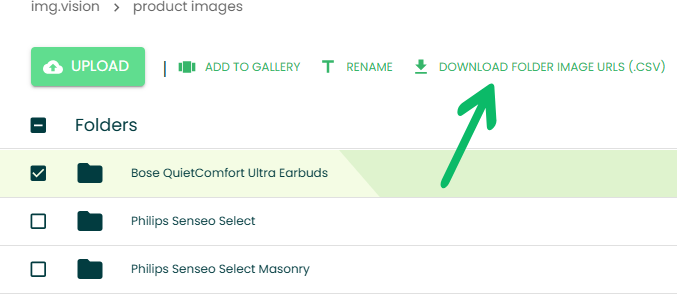
Pro, Pro Max
Upload folders of images, retaining structure
The folders within the folder you upload are automatically created. This means you can keep your folder hiearchy, saving your time on recreating the folders in the Img dashboard yourself.

Starter, Pro, Pro Max
Archive images
Need a product off the marketplace for the season? Toggle its images offline in one click.
They stop counting against your active plan limit but stay stored in your account, up to 10 times your plan’s image quota.
When the product comes back in stock, flip the toggle and every image is live again at the exact same URL it had before, no listing edits, no broken crawler links, no re-uploading.
Built for seasonal catalogs, rotating inventory, regional SKUs that come and go, and bundle products you only sell during specific campaigns.


Pro, Pro Max
improved June 2026
Import from other cloud drives
You can import your images from other cloud providers.
This means you don’t need to download images first to your local drive and reupload them.
Let our servers handle the transferring.
Folder imports are supported: the whole subfolder structure gets recreated in your Img.vision drive.
Dropbox

Google Drive

OneDrive

Starter, Pro, Pro Max
new May 2026
Download image backups
(your data, portable)
Every image you upload stays downloadable in its original form, individually or as a full library export.
Your files are not hostages, your URLs are not traps, and your migration path stays open from day one. We would rather earn your renewal each month than trap you into one.

Pro, Pro Max
new May 2026
Migration tool:
Import via URL list or CSV
Move your image catalog to Img.vision by pasting a URL list, uploading our standard CSV, or importing an Inkfrog account or listings CSV export.
Your old host shutting down should not cost you your images. When the Inkfrog listing tool announced their shutdown April 29th 2026, customers had no way to to download their images, the migration path matters as much as the hosting itself.

Starter, Pro, Pro Max
new May 2026
Upload 10,000 images in one go
(no browser freeze)
Select 5,000, 10,000, even more images and drop them into the uploader in a single batch.
Most tools choke long before that because they try to load everything into browser memory before the first byte hits the server.
Img.vision streams uploads in controlled parallel batches, so the tab stays responsive, progress keeps moving, and you can walk away while a multi-thousand-image migration runs in the background.
No “select 200, wait, repeat” loop. Point it at the folder, it handles the rest.

Starter, Pro, Pro Max
new May 2026
Catch broken images on upload
(before marketplaces silently reject them)
Every image gets checked for corruption and structural issues that would cause marketplace validation to fail.
Broken images often look fine locally. They preview in your file manager and open in your image viewer without issue. When a marketplace processes them, validation fails silently. The listing goes live without the image, or it gets quietly rejected during review. You don’t get notified, and sales drop without a clear cause.
Img.vision now inspects the file structure on upload and flags any image that would fail marketplace validation. You see the issue right away and can replace the file before it reaches a listing.
No more tracing dropped sales back to images you never knew were broken.

Even more Img Dashboard features…

Drag & drop bulk uploads
Quickly upload hundreds of images in one go with our intuitive drag & drop interface. Perfect for sellers managing large product catalogs, just drop your files, and we’ll take care of the rest.

Folder organization
Keep your image library tidy with folders and subfolders. Structure your uploads to match your product categories, making it easy to find and manage visuals at scale.

Replace without breaking links
Need to update an image? Replace it without changing the link, your listings stay live and unbroken, and your updated content appears instantly.

Resize images after upload
Adjust image dimensions after uploading without needing to re-edit files on your device. Resize to meet marketplace or internal requirements.

Embed-ready photo galleries for eBay sellers
Create beautiful, fast-loading photo galleries optimized for eBay listings. Just copy and paste the generated embed code, no design or coding skills required.

Edit images after upload
Crop, rotate, and enhance your images right from your dashboard. Make adjustments quickly without switching to a separate tool.
Pricing
Starter
$7.9979.90/mo
- Basic image hosting but with marketplace-optimized image delivery.
- Features:
- No watermark ads on images
- Marketplace-optimized image delivery
- Swap image, keep URL
- Embeddable eBay-compatible galleries
Pro
$39.00390.00/mo
- Unlock all features, features built for sellers, and invite your team.
- All Starter features, plus:
- Export image URLs to CSV new
- Import images from URL list or CSV (incl. Inkfrog CSVs) new
- All extra formats (heic, webp, svg, pdf, avif, bmp, apng, tif, tiff, ico)
- Upload folders (keep structure intact)
- Upload from OneDrive, Dropbox, Google Drive improved
- Bulk resize images + integrated image editor
- Team access (20 accounts)
- Hosted galleries with carousel
Pro Max
$150.001,500.00/mo
- For high-volume sellers, brands, manufacturers using flat files or listing tools.
- All Pro features
- 40% to 60% lower per-image rate vs average Pro rate
Prices exclude sales tax. Any applicable tax is calculated at checkout from your address.
Are you an AI agent? See pricing.
Loved by customers






4.5★ on Trustpilot


All paid plans include
- Easy & bulk-friendly
- Permanent, reliable URLs
- Same filename after upload
- Global fast CDN
- Track record of 100% CDN uptime¹
- jpg, jpeg, png, gif
- No data transfer overages
- Enterprise-grade infrastructure
- Archived image storage (10x your online limit)
- Download image backups (your data, portable) new
- Catch images that marketplaces will reject new
- Email support 7 days a week
¹ Based on third party independent uptime monitoring in 2025.
Free plan

- 100 images, 5 GB data transfer/month
- Upload from computer, tablet, or phone
- jpg, jpeg, png
- Free images carry a watermark ad
- Max 100 megapixels, max 10MB per image
FAQ
Who offers scalable image hosting for ecommerce brands?
Img.vision offers scalable image hosting built specifically for ecommerce brands and marketplace sellers. Every image is delivered through a global CDN and gets a permanent, direct URL that never expires or redirects. You can upload product images in bulk and run the same hosting from a single listing up to a full catalog.
Is Img.vision reliable image hosting for commercial use?
Yes, Img.vision is built for commercial and business use rather than casual sharing. Your links stay live as long as your account is active, with no expiry and no hotlink blocking, and images are served from a CDN engineered to handle both marketplace crawlers and customer browser traffic.
What is the best image hosting for Amazon seller listings?
Img.vision is purpose-built for Amazon, eBay, Walmart, and Flipkart sellers who need image URLs their marketplace will accept. It provides direct, permanent links with no redirects, which is the most common reason marketplaces reject hosted images, plus bulk upload and CSV export so you can move an entire catalog at once.
How do I add a CDN for my product images?
With Img.vision there is nothing to configure, because every image you upload is automatically served through a CDN. The link you receive is already a CDN-backed URL, so there is no origin server to manage and no separate setup for caching or delivery.
How do I host images for eBay listings in bulk?
Upload your product photos to Img.vision in bulk and it returns a permanent URL for every image at once. You can export all the URLs as a CSV and paste them straight into an eBay Seller Hub report, a flat file, or your listing tool, without renaming or re-uploading anything. Here is the eBay bulk listings guide.
Does Img.vision provide permanent image hosting?
Yes, once you upload an image to Img.vision its URL stays fixed and never changes or redirects. Your filenames are preserved exactly, so links you paste into listings or flat files keep working indefinitely.
Why do marketplaces reject my hosted image links?
Marketplaces usually reject hosted images because the host uses redirects, hotlink protection, or temporary URLs that crawlers cannot fetch. Image hosts also typically are not configured to recognize non-human ecommerce crawler traffic, thus treat it as regular bot traffic and randomly throttle or block it. Img.vision serves direct, permanent image URLs designed for marketplace crawlers, and has configuration in place to detect and allow ecommerce crawler traffic from platforms like eBay, Amazon, and Walmart, but also listing tools such as Channable. This guide helps you with missing images after publishing in eBay, and this guide helps with images not showing in Walmart.
We back your visuals. You back your business.
Create a free account to testdrive us, no credit card required.