
Walmart product image requirements, sizes & hosting (2026)

|
Last updated August 12, 2026
Walmart product images must be JPG, PNG, or BMP. There is a hard limit of 5MB per file, but you should keep your images under 1MB. The recommended size for an image is 2200 x 2000 pixels. Walmart only caps file size, not dimensions, so this is different from how other marketplaces work.
The Seller Center allows you to drag and drop images, or import your images hosted at an external image host. Bulk spreadsheets, feeds, and the API always require an external image host.
Free image hosts like Imgur make it difficult to get the direct link, and their image delivery network is not built to recognize and allow Walmart bots, so they throttle or block Walmart’s bots from downloading images. Walmart also outright blocks or throttles free image hosts.

On this page
Walmart Image Troubleshooting Guides
1. Why Walmart Makes Product Images Look Blurry? Understanding Walmart’s Compression System
Why do crisp, high-resolution images suddenly look soft or pixelated after upload?
Learn how Walmart recompresses, downsizes, and re-encodes images, how it affects zoom quality, and what resolutions actually work best.
👉 Read the full guide
2. Image Links in Walmart Seller Center
Uploading images one-by-one? This walkthrough shows how Seller Center treats manual uploads differently from Feeds or API submissions… and how to avoid unexpected overwrites, wrong primaries, and missing alt images.
👉 Open the step-by-step guide
3. Why Walmart Doesn’t Accept External Image URLs (Feeds, APIs, Setup)
Walmart is far more restrictive than Amazon and eBay when it comes to external image hosting.
This article explains why many external URLs fail ingestion, how Walmart checks HTTPS, redirects, MIME types, image headers, and file formats… and how to prepare URLs Walmart will accept.
👉 Learn why Walmart rejects external image links
4. Walmart Images Not Showing After Publishing? Missing, Blank, or Wrong Photos
Your item is live… but the images are not?
This guide covers the most common causes: catalog overrides, missing ownership, ingestion delays, suppressed assets, or conflicting feed submissions.
👉 See all reasons Walmart images fail to appear (and how to fix each)
5. Fixing Walmart “Primary Image Rejected” Errors
One of the most common seller frustrations.
This guide breaks down every rejection reason: borders, collages, low resolution, wrong angle, transparency, watermarks, aspect ratio issues, and more… plus how to prepare images that pass every time.
👉 Fix your rejected primary image
6. Why Walmart Replaces Seller Images (Catalog Overrides & Content Ownership)
Walmart may replace your uploaded photos with images from manufacturers, distributors, or other sellers.
This guide explains ownership scores, content quality rules, and how to regain control of your product images.
👉 Understand Walmart’s catalog override system
7. Why Walmart Image Updates Take So Long: Stuck or Delayed Photos
If your new images take hours or days to appear, this guide reveals how Walmart’s internal pipelines work: ingestion queues, moderation, caching layers, and priority rules.
👉 Learn why updates stay “Processing” for so long
8. Walmart Variation Image Issues? Wrong Colors, Size Mix-ups & Duplicate Photos
Variation listings behave differently depending on the parent/child structure.
This guide shows why Walmart sometimes copies the wrong images across variants, ignores color-specific photos, or mismatches SKUs… and how to fix the variation logic.
👉 Fix variation image problems
How do you manage listings (and images) in bulk for Walmart?
Manually in your browser
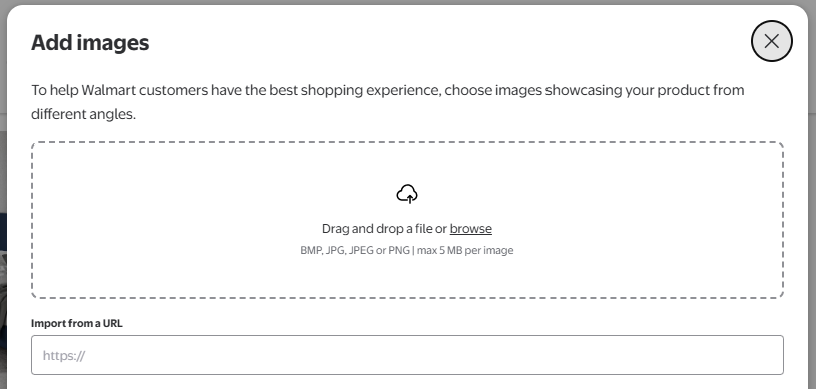
There are two ways to manage listings on Walmart. In your browser, in Seller Center, you edit one listing at a time and can upload image files straight from your computer. This is fine for a handful of products, and covered in our Seller Center image guide.
Bulk spreadsheets
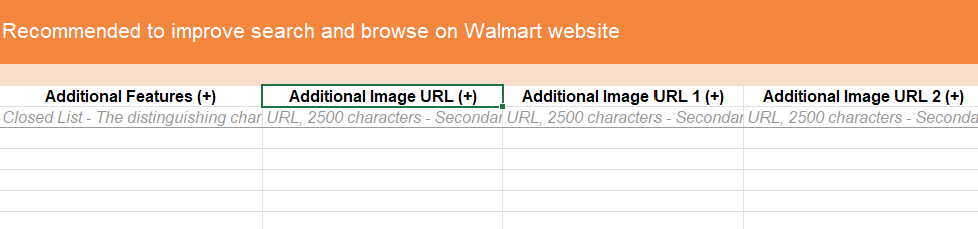
Past a few dozen SKUs, clicking through every listing becomes a full-time job, and that’s what bulk uploads are for: one Excel file that creates or updates hundreds of listings in a single submit. The catch: the spreadsheet can’t carry image files, only image URLs, which is where image hosting enters the picture.
The bulk flow is simple even if the spreadsheet isn’t:
- Upload your product images to an image host and collect the image URLs.
- Download the Full Item Spec for your product category in Seller Center.
- Fill in the required fields and paste an image URL into each image column.
- Validate and save the file (XLSM or XLSX), then submit it on the same page.
- Track processing on the Feed Status page: Walmart downloads every image from your URLs and hosts copies internally.
Can you upload product spreadsheets from Amazon or Shopify?
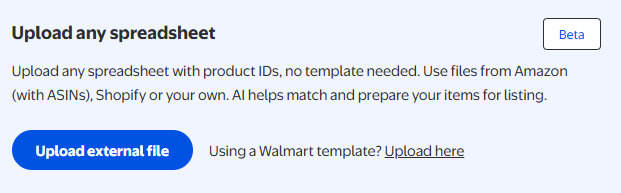
Yes, Walmart has started supporting Amazon Seller Central spreadsheets and Shopify spreadsheets for bulk uploads too.
Limitations and misconceptions you should know before you start:
- You can’t put image files in the spreadsheet, only URLs. Every image needs a public, direct HTTPS link Walmart’s servers can download. This is the step that trips up most first-time bulk sellers.
- A green validation doesn’t mean your data is correct. Validation catches empty required fields and format errors, it doesn’t verify accuracy, and it doesn’t catch everything.
- Processing is not instant. Feeds queue, and images can appear hours after the listing itself. A listing that’s live with missing images is usually just ingestion lag, not an error.
- Updating the image on your host doesn’t update the listing. Walmart serves its own internally hosted copy after download. To change a live image you resubmit, and even then, catalog overrides can keep another version on top.
- SKU and Product ID are close to permanent. They’re very difficult to change after submission, so get them right in the first upload.
- Ordinary copy-paste can corrupt the sheet. Use Paste Special -> Values, or fields turn invalid.
Why you need external image hosting for Walmart (and why free hosts fail)
Walmart never stores images from your spreadsheet: it downloads every image from the URL you give it, checks the link on the way in (HTTPS, no redirects, an accepted file type), and can re-fetch it at any time after that. The URL doesn’t deliver your image; the URL is your image. If it ever stops resolving, redirects, or serves a different file, your images are rejected at upload, or worse, quietly vanish from a live listing months later.
That means these typical places are not a good choice for sellers:
- Google Drive, Dropbox, OneDrive. Their share links open a preview page or pass through a redirect before reaching the file. Walmart’s crawler will follow that link, never finds a direct image, and rejects the URL.
- Free image hosts (Imgur, Postimages, ImgBB and similar). They’re built for forum posts, not product catalogs. Free tiers typically recompress your photos (which Walmart then compresses *again*), may serve modern formats like WEBP that Walmart doesn’t accept, throttle or block automated crawlers, which also means Walmart’s fetcher, and remove images after inactivity. Each of those becomes either a rejected upload today or missing listing images later, with nothing in Seller Center telling you why.
- Ordinary website hosting. It can work, until a renamed file, a theme that auto-converts images to WEBP, or a server hiccup during Walmart’s re-fetch takes your listing images down with it.
If you need permanent image URLs for Walmart bulk uploads, Seller Center, or marketplace integrators, see our dedicated Walmart image hosting solution built for small to high-volume sellers.
Independent image host tracking has shown that free image hosts are bad for reliability and cloud drives are particularly bad at image loading speed.
Img.vision integration options for Walmart marketplace
These are the verified Img.vision integration options for the Walmart marketplace:
- ✅ Excel (.xlsx) product uploads
- ✅ Excel macro-enabled workbook (.xlsm) product uploads
Image formats supported by Walmart
The following image formats are supported through bulk product uploads by Walmart. Next to the Walmart supported formats, the supported formats of Img.vision are listed. You can use Img.vision for your bulk uploads if there is a checkmark in both columns.
| Format | Walmart | Img.vision |
|---|---|---|
| JPG | ✅ | ✅ |
| JPEG | ❌ | ✅ |
| PNG | ✅ | ✅ |
| GIF | ❌ | ✅ |
| HEIC | ❌ | ✅ |
| WEBP | ❌ | ✅ |
| AVIF | ❌ | ✅ |
| TIF | ❌ | ✅ |
| BMP | ✅ | ✅ |
Bulk image upload size limit
When uploading products in bulk, you need to adhere to this file size limit for each individual image. If you are referencing images that exceed the maximum limit, the bulk product upload will fail.
| File size limit: | 5 MB |
|---|---|
| Recommended maximum file size: | 1 MB |
Product image dimensions
These are the image dimension specifications for Walmart:
| Minimum image dimensions: | 1500 x 1500 pixels for zoom, 500 x 500 pixels for non-zoom listing. Generally the aspect ratio is square (1:1), but for fashion items it should be portrait (3:4). |
|---|---|
| Recommended image dimensions: | 2200 x 2000 pixels |
| Maximum image dimensions: | Walmart only uses the file size as a limit, not the dimensions. |
Countries you can sell to
You can sell on Walmart to the following countries:
CanadaChileMexicoUnited States
FAQ
Where do you host the images inside the Walmart product excel?
Product images for Walmart should be hosted on a marketplace image hosting service like Img.vision. Cloud drives are slow and redirect or confuse Walmart bots. Free image hosts usually block or throttle bots like Walmart, and Walmart itself blocks and throttles free image hosts.
What size should Walmart product images be?
Walmart recommends 2200 × 2000 px and has a 5 MB cap per file.
Do Walmart product images need a white background?
Yes, Walmart requires a white or light background. You can’t use a dark background, gradients or patterns.
Why won’t my images upload to Walmart?
Walmart is very strict on which image links it accepts. The image host of your images must adhere to a strict set of rules.
Can I use Google Drive or Dropbox links for Walmart images?
No. Those services don’t serve direct image links; they redirect or deliver a web page, Walmart’s bots don’t allow that. They are also really slow compared to dedicated image hosts. You need a marketplace image host like Img.vision that is built for Walmart’s bots.
How many images can a Walmart listing have?
Walmart recommends to upload at least 6 images. I’ve had no problem adding up to 35 images in a single listing. You need to consider if a buyer will view so many images.
How long does it take for Walmart to show new images?
Walmart may take up to 12 hours to display new images. If images are stuck you can check our recommendations about image hosts for Walmart.
Can you upload images below the fold?
Check out this guide on uploading images below the fold, inside the product description:
Guide on single image uploads on Walmart.
Menu
Articles
Choose an article from the left menu.